JP Technology Initiatives Inc.

How Foottroller Works: four-way movement control, walk-in-place, and pedal modes
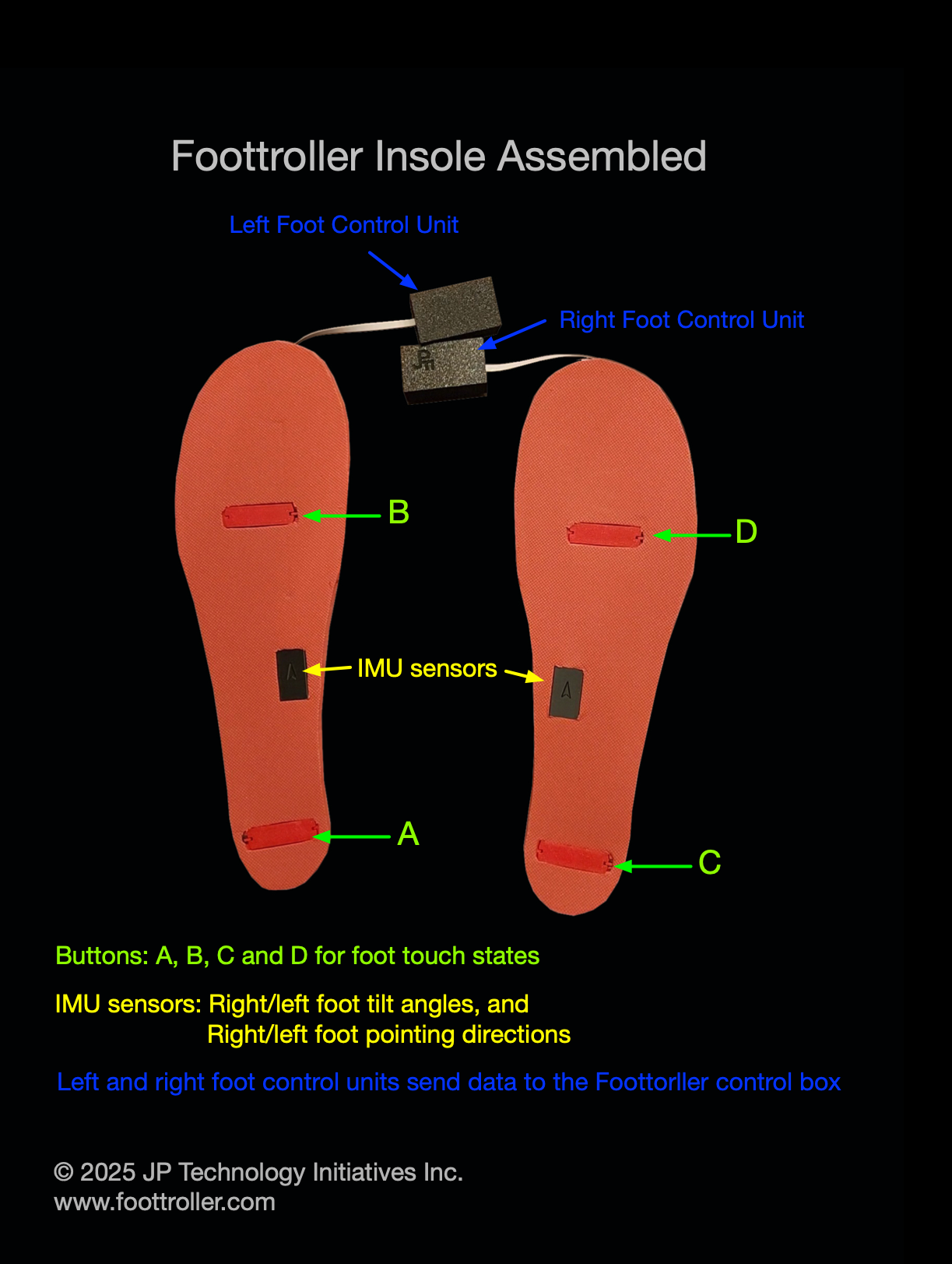
Foottroller insoles
Foottroller control box
Operation mode 1: Four-way movement control
OpMode 1 for locomotion control has two control states S0 (stationary) and S1.1 (moving state 1)
Instructions:
Start movement (S0 -> S1.1) with four-way movement control:
Move forward: foot touch state ABD & right foot tilt forward
Move backward: foot touch state ABC & right foot tilt backward
Move right: foot touch state BCD & left foot tilt forward
Move left: foot touch state ACD & left foot tilt backward
Speed control in S1.1: use the foot tilt angle of the tilted left/right foot to control movement speed.
Stop movement (S1.1 -> S0): lifting the left foot or the right foot off the ground, or full press with foot touch state ABCD.

Operation mode 2: Four-way movement control + Walk/Run in Place
OpMode 2 adds Walk/Run-in-place (control state S1.2) to OpMode 1 for immersive locomotion control, which allows the user to walk/run in virtual environments.
In OpMode 2 only x and y axes are active for lateral and forward/backward movement control
Instructions:
Start movement (control state S0 -> S1.1): same as in OpMode 1 with four-way movement control.
Movement speed control in S1.1: same as in OpMode 1 using foot tilt angle to adjust movement speed.
Start walk/run in place (control state S1.1 -> S1.2): lift the tilted foot off ground and start walk/run in place.
Movement speed control in S1.2: walk/run-in-place consists of switches between left foot steps (standing on the left foot) and right foot steps (standing on the right foot). The movement speed is in S1.2 is controlled by the duration of the left steps and the right steps. Shorter step durations lead to faster movement speed.
Stop the movement (control state S1.2 -> S0): Foot touch state ABCD.
Note that while walking/running in place, i.e., in control state S1.2, the user can have both feet pressing the ground, e.g., with foot touch state ABC, or ABD, which will not stop the movement or change the movement speed. This allows the addition of new controls, e.g., turn controls, with foot gestures while moving.

Operation mode 3: Pedal mode
Developer mode (raw axes & buttons)
OpMode 3 is for driving games on PC where Foottroller functions as pedals for acceleration and brake control.
In OpMode 3 only Rx and Ry axes of the Foottroller gamepad are active.
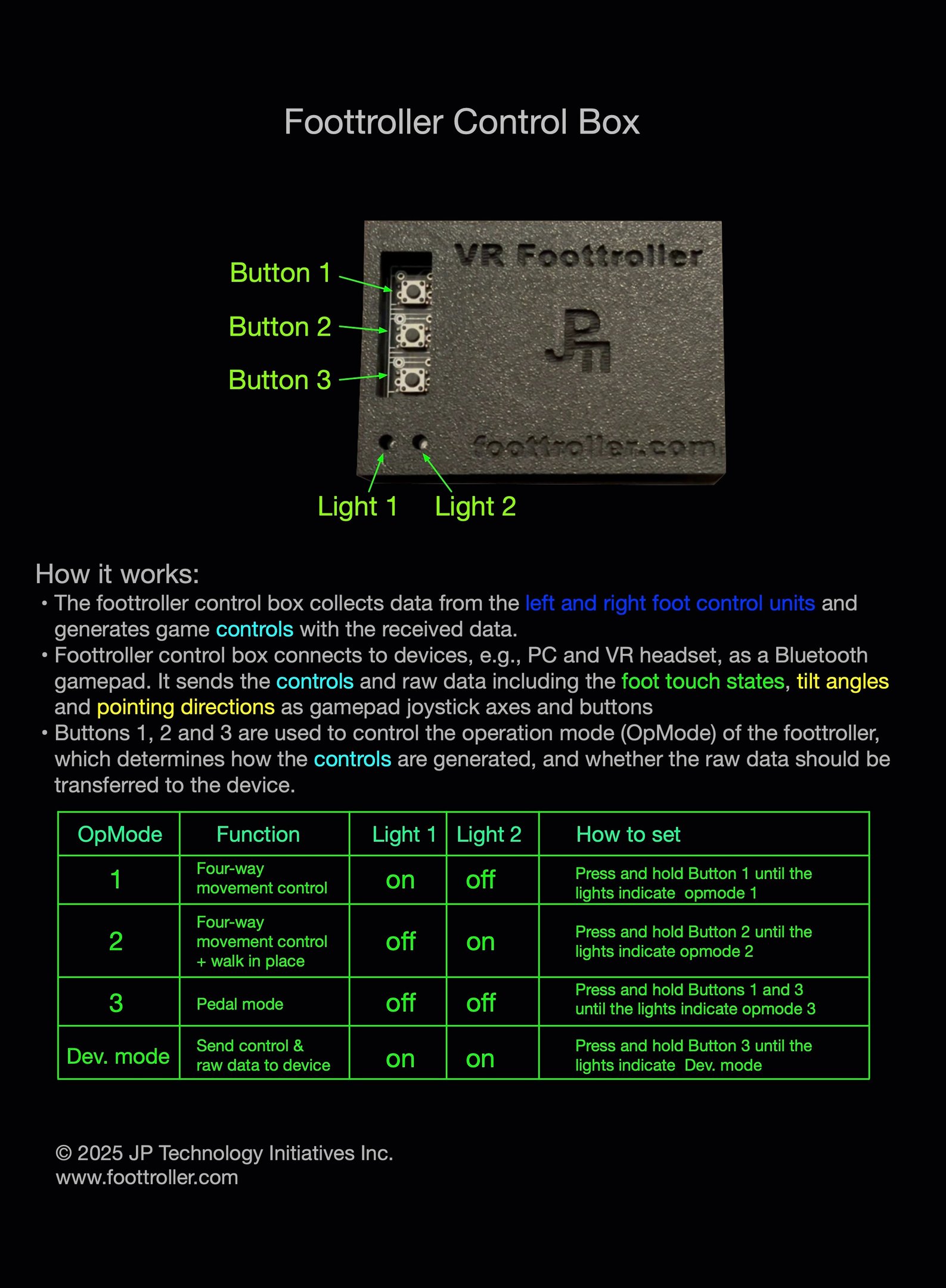
When Dev. mode is enabled, Foottroller will send not only the generated locomotion controls but also the raw Foottroller data to the device.
In Dev. mode active Foottroller gamepad axes and buttons are:
x: for lateral movement control
y: for forward and backward movement control
z: right foot pointing direction
Rx: left foot tilt angle
Ry: left foot pointing direction
Rz: right foot tilt angle
Button 1: A (heel)
Button 2: B (ball)
Button 3: C (heel)
Button 4: D (ball)
Recommended use: In Dev. mode, developers will have full access to all basic Foottroller control elements to develop customized control functions.
Example Foottroller Locomotion Integration in VR Game Development

Standalone Meta Quest VR game with Hands-Free Natural Walking Developed in Under 15 Minutes: Foottroller + Vertex Form 3D
Add Foottroller locomotion to standalone VR games in Unity (Video Guide)
Customized Control Schemes


Skating
Soccer

Driving

Flying Airplane
Video Tutorial

The tutorial video explains fundamentals of the Foottroller technology, and the 3-state control process for locomotion control. A recommended watch for Foottroller users and developers. (Download slides)
Key concepts:
Foottroller control elements:
Foot touch state with buttons A (heel), B (ball), C (heel) and D (ball)
Foot tilt angles
Foot pointing directions.
Foottroller locomotion as a 3-state control process
S0: stationary state
S1.1: moving state 1 with four-way movement control
S1.2: moving state 2 for walk/run-in-place
FAQ
Is Foottroller a VR treadmill?
No. It is a low-cost alternative. You walk or run in place (or use four-way foot gestures). There is no sliding platform or harness. Omni One and KAT Walk are full rigs; Foottroller is a foot controller that straps on or ships as a wearable unit.
How is it cheaper than a VR treadmill?
A typical omnidirectional treadmill is about $1,000–$2,500 and needs floor space. Foottroller Crampons are about $86 (power banks extra) and work in a normal playspace. You trade the sliding-floor feel for price and portability.
Does walk-in-place feel like a treadmill?
You stay in one spot and step. Speed follows step timing (and Hub speed settings). That is the same idea as walking for locomotion, not the same hardware as a moving deck.
Which mode replaces treadmill-style walking?
Mode 2 — walk/run in place. Start with a four-way gesture, then step. Mode 1 is tilt-and-gesture direction only. Pedal mode is for racing, not walking.
Can I use Foottroller on a real exercise treadmill?
Yes for some tours and walking games: start movement with Foottroller, then start the belt; keep a hand on the rail. That is optional. Most owners just walk in place on the floor.
Do I need a special runtime to “replace” a treadmill?
No. Pair as a Bluetooth gamepad (Quest) or use Hub / SteamVR / VDXR on PC. Treadmill alternatives are about locomotion input, not a particular sim.
Comparing Foottroller to Omni One / KAT Walk? See Foottroller vs VR treadmills
Contact
email:
support@jptiinc.com
© 2025 JP Technology Initiatives Inc. All rights reserved.
address:
JP Technology Initiatives Inc.
45 Colvin Ave, Suite 120
Albany NY 12206 USA